Best AI Writing Tools for Content Teams Under $100/Month
What you actually get at each price tier below $100/month — feature comparisons, word limits, team seats, and honest picks for small content teams on a budget.
Key Takeaways
- Rytr at $29/month is the best pure-value tool under $30 for solo writers with moderate volume needs
- Writesonic's Individual plan ($20/month) and Copy.ai's Pro plan ($49/month) cover most small team use cases under $100
- Team seats at sub-$100 pricing are rare — most tools charge per seat, which multiplies cost fast
- Word limits matter more than price tier — a $29/month plan with a 30,000-word cap is often more limiting than it appears
- Sub-$100 is enough for teams producing 10-15 blog posts per month; high-volume operations need to budget higher
Most AI writing tools talk about their pricing like the headline plan number is the whole story. It’s not. The real cost question for a content team isn’t “what does this cost per seat?” — it’s “what do we actually get at this price, and when do we hit the ceiling?”
This post breaks down what’s available under $100/month across each price tier, which tools offer the best feature set at each level, where the limits bite, and when you should stop trying to make sub-$100 work and just pay more.
Tier 1: $0–$29/Month
Free Plans: What’s Actually Usable
Most free plans in this space are lead magnets with heavy output restrictions. Here’s the honest breakdown:
Copy.ai Free — 2,000 words/month. Fine for testing, not for production. The chat interface is good for one-off tasks, but you’ll hit the cap in two articles.
Writesonic Free — 10,000 words/month on the trial, but the free tier post-trial drops significantly. Not a real free plan for ongoing use.
Rytr Free — 10,000 characters/month (roughly 1,500-2,000 words). Functional for light personal use, genuinely limiting for even a one-person team.
The honest verdict on free plans: They’re useful for evaluating whether a tool’s output quality fits your needs. They’re not a viable ongoing solution for any team producing content regularly.
$9–$29/Month: The Solo Writer Tier
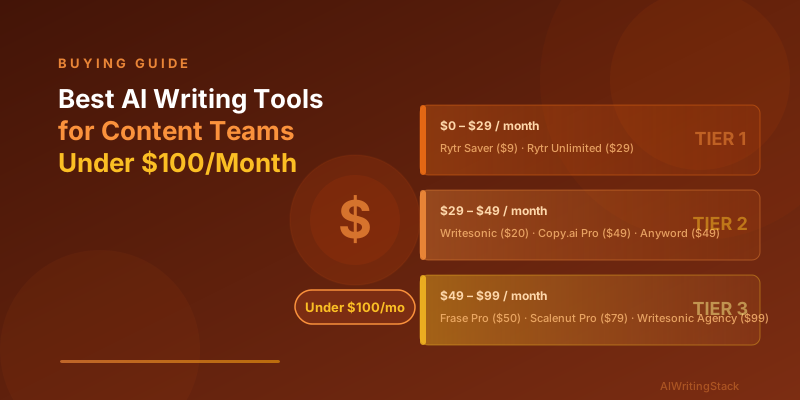
Rytr Saver Plan — $9/month
Rytr is one of the few tools that keeps a meaningful feature set at single-digit pricing. The $9/month Saver plan gives you 100,000 characters/month (roughly 15,000-18,000 words), access to 30+ use case templates, 35 tone options, and 30+ language support.
For a solo content writer producing 4-6 pieces per month, this is enough. You won’t be running a content agency on it, but the cap is real rather than aspirational. The output quality is serviceable — competent, not polished. Plan on editing time.
Rytr Unlimited Plan — $29/month
This removes the character limit entirely. For $29/month, you get unlimited generation, the full template library, API access, a plagiarism checker, and dedicated account support. For a solo writer or a two-person team where one person handles the AI generation, this is excellent value.
It also makes the “should I upgrade” decision clear: if you’re hitting the Saver cap regularly, spend $20 more and stop thinking about it.
Tier 2: $29–$49/Month
This is where the real options open up for small teams.
Writesonic Individual — $20/month (fits here on annual billing, ~$20)
At $20/month (or $16/month on annual billing), Writesonic’s Individual plan gives you access to the Article Writer, product description templates, social copy generators, and a solid AI chat interface. Word limits depend on the quality setting — using the “Economy” quality mode extends your words significantly versus “Premium.”
One practical note: Writesonic’s Article Writer at this tier produces better structured long-form drafts than Rytr, but requires more prompt refinement to get consistent quality.
Copy.ai Pro — $49/month
Copy.ai’s Pro plan at $49/month is one of the better-value plans in this range for small teams. You get unlimited words, 90+ copywriting templates, the Chat interface for freeform generation, and access to workflows (multi-step automated content pipelines). Up to 5 seats are technically included, though the collaboration features are basic.
The unlimited words claim is genuine — there’s no hidden monthly cap. For a team of two or three producing varied content types (email copy, blog posts, social, ad variants), Copy.ai Pro covers a lot of ground without hitting arbitrary walls.
Anyword Starter — $49/month
Anyword differentiates with its Performance Score — a predictive score for how copy is likely to perform with specific audiences. At $49/month, you get 1 seat, 20,000 words/month (which is limiting), and the Performance Score on all outputs.
For paid ad teams or email marketers who want data-informed copy rather than just fast copy, Anyword earns its cost even at 20,000 words. For bloggers and content writers focused on volume, the word cap makes this frustrating.
Tier 3: $49–$99/Month
Frase Pro — ~$45-$50/month
Frase at this price point is the strongest pick for any team where SEO content is the primary output. You get the research suite (SERP analysis, competitor content mapping, People Also Ask data), the AI content editor with NLP term suggestions, and enough AI generation to run a meaningful content operation.
One seat. Not built for teams editing in the same document. But for a content marketer or SEO managing the production process solo or with a small team working sequentially, it covers the workflow well. Our how to use AI writing tools for SEO guide pairs well with this setup.
Writesonic Agency — $99/month
At the top of this range, Writesonic’s Agency plan gives you 4 seats, unlimited words, priority access to the Article Writer, and API access. For a small agency or a 3-4 person content team, this is one of the more honest sub-$100 team plans available. At $99 split across 4 seats, the per-seat cost is $24.75 — hard to beat for the feature set.
Scalenut Pro — $79/month
Scalenut’s Pro plan includes 30 AI-generated articles per month via Cruise Mode, unlimited SEO reports, and 2 seats. For a two-person team focused on high-volume SEO content, this works. Thirty AI-generated articles is substantial output if you’re editing and publishing most of them.
Jasper Creator — $49/month (1 seat)
Jasper AI at $49/month gives you 1 seat and unlimited words in the Creator plan. The output quality is noticeably better than tools at this price tier, and the brand voice feature is genuinely useful. The limitation is the single seat — teams need the Pro plan at $69/month per seat, which pushes past $100 quickly.
For solo writers or content leads doing all the drafting themselves, Jasper Creator at $49 is one of the better tools per dollar. For actual team collaboration, you’ll need to budget more.
Team Seats Under $100: The Honest Picture
This is where the sub-$100 dream runs into math. Most tools charge per seat at meaningful plan tiers, which means a two-person team often pays $98-$138/month before reaching a useful feature set. Here’s what actually works for teams:
| Tool | Sub-$100 Team Option | Seats Included | Key Limitation |
|---|---|---|---|
| Copy.ai Pro | $49/month | Up to 5 | Basic collaboration features |
| Writesonic Agency | $99/month | 4 seats | At the exact ceiling |
| Rytr Unlimited | $29/month | 1 seat | Solo only |
| Scalenut Pro | $79/month | 2 seats | 30 articles/month cap |
| Jasper Creator | $49/month | 1 seat | Solo only |
If you need real multi-seat collaboration with shared brand voice, document history, and team permissions, most tools push you past $100/month. That’s just the reality. The sub-$100 options work for teams where one person does the AI generation and others review outputs, rather than everyone drafting simultaneously.
When Sub-$100 Is Enough
Sub-$100 covers you if:
- You’re publishing 10-15 blog posts per month with 1-2 people writing
- Your content types are mixed (blog, email, social) rather than exclusively long-form articles
- You don’t need advanced SEO features baked into the writing tool
- You’re willing to edit AI output rather than publish it directly
It stops being enough when:
- You need more than 2-3 concurrent seats with meaningful permissions
- You’re producing 25+ pieces of content per month
- You need SERP-level SEO integration (add Frase at minimum)
- Brand consistency across large teams requires a true brand voice system
For a fuller picture of cost across the full range of tools, see our AI writing tool pricing compared post.
Best Picks by Situation
Solo writer, budget-first: Rytr Unlimited at $29/month. Unlimited output, solid templates, API access for later.
Small team (2-3 people), general content: Copy.ai Pro at $49/month. Unlimited words, 90+ templates, basic multi-seat access.
Small team, SEO focus: Frase Pro at ~$50/month. The research infrastructure justifies the cost even for one-person teams.
Best output quality under $100: Jasper Creator at $49/month (1 seat only). For teams, budget $69/month per seat and consider whether Writesonic Agency at $99 for 4 seats makes more sense.
High-volume SEO publishing, 2 people: Scalenut Pro at $79/month. 30 Cruise Mode articles is meaningful throughput.
The Bottom Line
The sub-$100 tier is viable for small teams if you’re honest about what “team” means here — usually one person generating and one or two reviewing, not three people simultaneously drafting in the same tool.
The tools that deliver the most at this price: Copy.ai Pro, Writesonic (Individual or Agency depending on seat count), and Rytr Unlimited. If SEO is central to your work, Frase at ~$50/month is the clear add-on or replacement.
Also worth reading before you commit: the real cost of AI writing tools — because the subscription price is often only part of what you’re actually spending. And if you’re weighing options between specific tools, our Jasper vs Writesonic comparison and Copy.ai vs Rytr breakdown go deeper on how those pairs stack up head-to-head at similar price points.
Written by the AIWritingStack Team
SEO & content workflow specialists · Published April 6, 2026